Xactimate Estimate Example (Full Breakdown for Contractors)



What Is a Xactimate Estimate?
A Xactimate estimate is a structured report listing repair costs for property damage.
Typical claims include:
- water damage
- fire damage
- storm damage
- roof damage
The estimate is built using Xactimate’s pricing database.
Xactimate is the most widely used estimating software in the insurance restoration industry. Contractors, insurance adjusters, and public adjusters use Xactimate estimates to document repair costs for property damage claims.
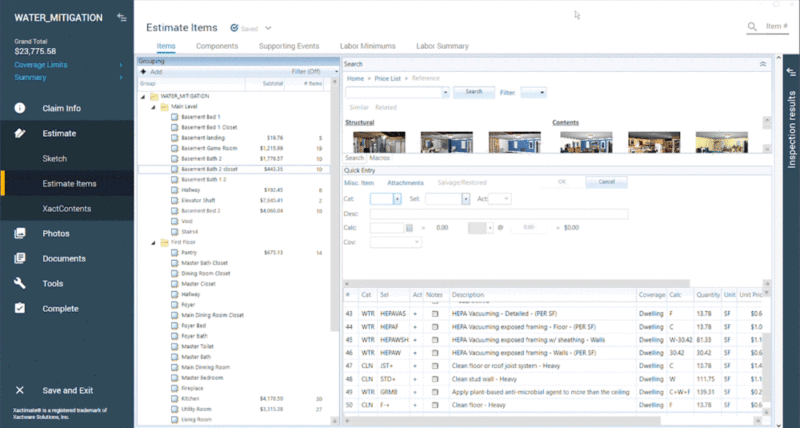
Anatomy of a Xactimate Estimate
A standard estimate includes:
Claim Information
- insured name
- claim number
- property address
Estimate Summary
Total cost of repairs.
Line Items
Example:
Remove damaged drywallInstall new drywallPaint wallsReplace flooring
Each line item includes:
- quantity
- unit price
- labor
- materials
Folder Structure
Estimates are organized into folders such as:
Living RoomKitchenBedroomRoofExterior
This keeps the estimate organized and easy to review.
How Contractors Review Adjuster Estimates
Contractors often compare their scope of work against the adjuster's estimate.
They look for:
- missing line items
- incorrect quantities
- outdated pricing
This process is called estimate reconciliation.
Why ESX Files Matter
When contractors receive an estimate as a PDF, they cannot edit it.
But if the estimate is provided as an ESX file, it can be opened directly in Xactimate.
That allows contractors to:
- modify line items
- update quantities
- add missing work
Converting PDF Estimates into ESX
If you receive an estimate as a PDF, you normally have to rebuild the estimate manually.
Instead, you can convert the PDF into an ESX file using a PDF to ESX conversion tool.
The EstimateHub PDF to ESX converter automatically reconstructs estimates into structured ESX files.
Conclusion
Understanding how Xactimate estimates are structured helps contractors review and adjust insurance claim estimates more effectively.
Working with ESX files instead of PDFs allows for faster editing and more accurate estimate reconciliation.